Clone Submodules
Enable Retrieve Submodules in a job's Checkout Code step to initialize and recursively update the submodules recorded by that commit. Commit both .gitmodules and each submodule's Git reference before running the job.
The URLs in .gitmodules must be reachable from the machine performing checkout. For example, the server Docker executor performs checkout on the server host. A Docker Desktop hostname such as host.docker.internal may work inside a job container but fail to resolve on that host. Remote executors need addresses reachable from their agent machines.
HTTP(S) Credentials
For submodules hosted by OneDev:
- Create an access token whose effective permissions include Read Code on the main project and every private submodule project. Account permissions and token scopes both matter.
- Open the main project's Settings / Build / Job Secrets and add the token as a secret, for example
submodule-token. Authorize only the branches or jobs that need it. - Edit the Checkout Code step. Select HTTP(S) for Clone Credential, choose the secret under Access Token Secret, and enable Retrieve Submodules.
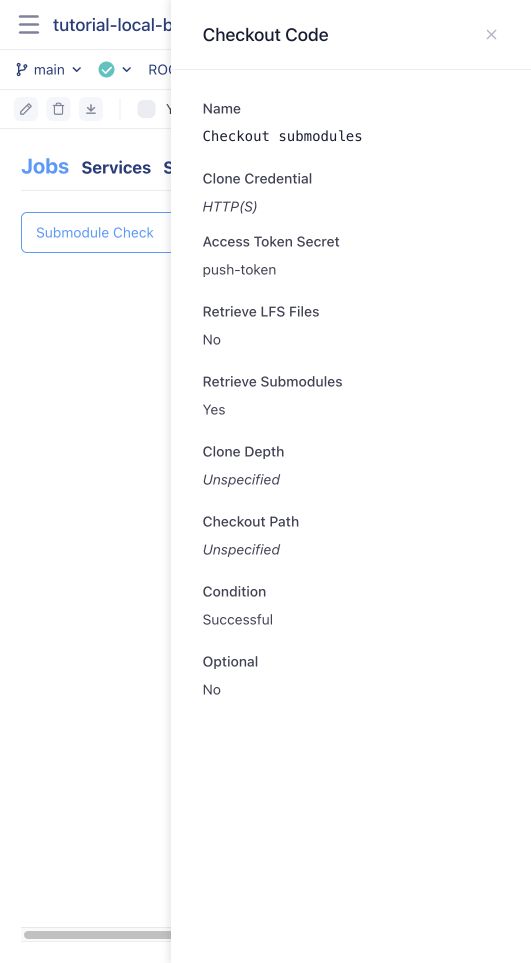
The equivalent step in .onedev-buildspec.yml is:
- type: CheckoutStep
  name: Checkout submodules
  cloneCredential:
    type: HttpCredential
    accessTokenSecret: submodule-token
  withLfs: false
  withSubmodules: true
  condition: SUCCESSFUL
The screenshot uses the existing test secret push-token; the name is arbitrary. Use a token with read-only permissions when the job only needs to clone. Public submodules may already be readable through the project's default role. Do not assume the default checkout credential grants access to unrelated private projects.
SSH Credentials
-
Use submodule URLs with the same host as OneDev's SSH Root URL in Administration / System Settings, including the correct SSH port. For example:
[submodule "examples"]path = examplesurl = ssh://[email protected]:6611/shared/examples.git -
Add a dedicated public SSH key to an account that can read the main project and every submodule project, using that account's SSH Keys page. Verify local access with the matching private key, for example
git ls-remote <SSH-clone-URL> HEAD. -
In the main project's Settings / Build / Job Secrets, store the complete matching private key, including its header, footer, and line breaks. Give it a name such as
submodule-keyand appropriate authorization. -
Set Clone Credential to SSH, select that secret under Key Secret, and enable Retrieve Submodules.
- type: CheckoutStep
  name: Checkout SSH submodules
  cloneCredential:
    type: SshCredential
    keySecret: submodule-key
  withLfs: false
  withSubmodules: true
  condition: SUCCESSFUL
Use a key that the unattended job can load. OneDev supplies the configured OneDev SSH server's host key for checkout; keep submodule hostnames consistent with that configuration.
Verify the Result
Check the build log for successful submodule retrieval. In a later command step, run git submodule status and read a known file from the submodule to verify its contents. Both HTTP and SSH checkout were exercised against local OneDev projects in this example:
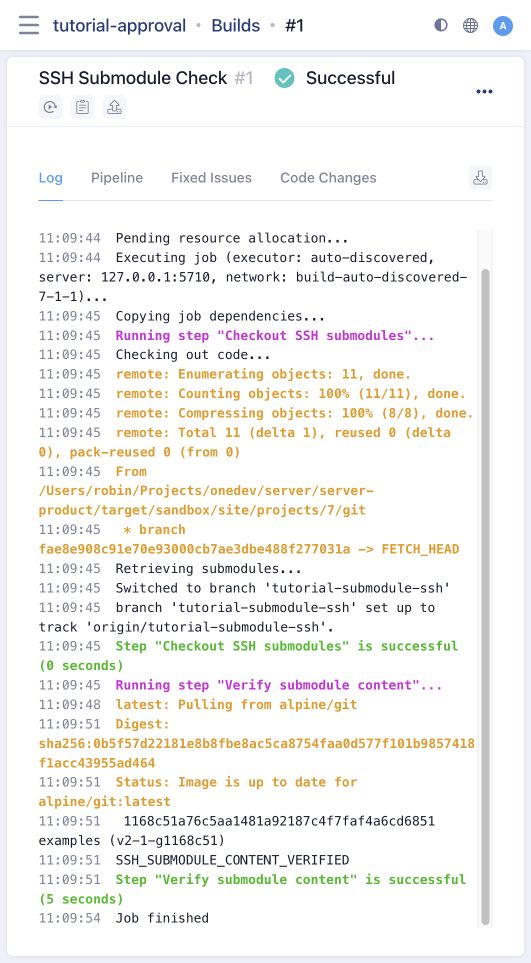
A missing submodule path usually means the Git reference was not committed or Retrieve Submodules was disabled. For authentication failures, check the credential owner's access, token scopes or key, and secret authorization. For DNS or connection failures, check connectivity from the checkout host.