Annotate Source with Jest/ESLint Information
OneDev publishes Jest tests, Jest coverage, and ESLint problems as build reports. Coverage and problem markers also appear beside source lines and pull-request changes.
Run the example
-
Create a disposable Git project in OneDev. Download and extract this small JavaScript example, including its hidden
.onedev-buildspec.ymland.gitignorefiles, into your checkout. Commit and push the files. The example pins the package versions used for this tutorial; update them according to your project's dependency policy. -
Use a Docker-capable job executor. The Annotate Sources job runs in
node:22and installs public npm dependencies. The first build should pass two Jest tests. Its divide-by-zero error path is intentionally untested. -
Open the build's Jest Tests, Jest Coverage, and ESLint reports. The clean version has no ESLint problems.
-
Create a branch and insert
const unusedAdd = true;insideadd, andconst unusedDivide = true;insidedivide, insrc/calculator.js. Commit, push, and open a pull request. The example runs on branch updates and pull-request updates. -
Check the new build. The tests still pass, while Publish ESLint problems fails because the report contains High-severity findings. The reports remain available on the failed build.
Inspect the annotations
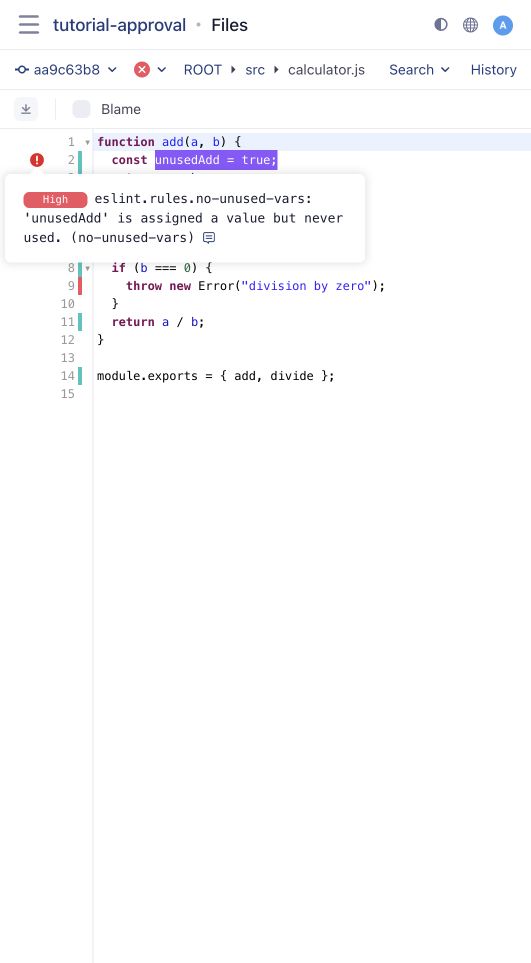
Open src/calculator.js at the built branch revision. Coverage markers distinguish covered and uncovered executable lines. Click a problem marker to read the ESLint finding.
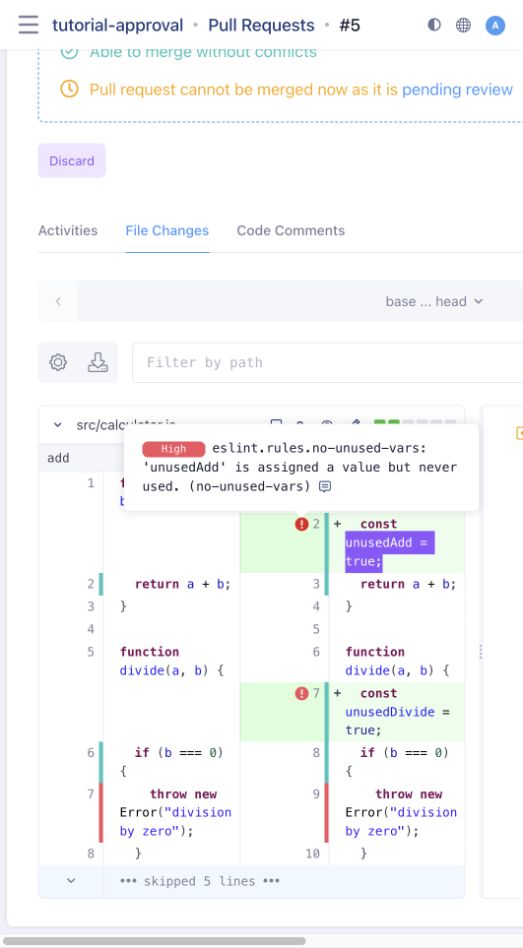
Open the pull request's File Changes tab to see annotations on the diff. In this example, both new lines have unused-variable findings, and the exception remains uncovered:
A pull-request build checks its test merge commit. To annotate the branch's ordinary file view, also build that source commit, as the example's branch-update trigger does. Reports from a different revision do not automatically annotate the current file.
Adapt it to your project
The example runs Jest with --coverage --json --outputFile=jest-result.json and enables the clover coverage reporter. It runs ESLint with the separately installed eslint-formatter-checkstyle, writing eslint-result.xml.
Three publishing steps consume these files:
| Step | File |
|---|---|
| Publish Jest Report | jest-result.json |
| Publish Jest Coverage Report | coverage/clover.xml |
| Publish ESLint Report | eslint-result.xml |
Set the publishing steps to run Always, so failures do not hide reports. Preserve Jest's exit status. ESLint exit code 1 means findings were reported; the publishing step applies the configured severity threshold. Configuration errors (exit code greater than 1) still fail the command. Do not use ESLint's automatic fixes in this job: annotations should refer to the committed source being reviewed.
Keep report paths aligned with the checked-out repository. Configure branch protection separately if this job must pass before merging; a trigger alone does not make a job required.